

Rainbet App IE
Players in Ireland get the Rainbet App straight from our site rather than from a store, as a Web App that saves to your home screen in under a minute on Android or iPhone. Further down you’ll see why it works this way, how to set it up, what plays best on a touchscreen and how to spot a fake download.

Live Games
Betting
More Games
Mobile Friendly
Fast Withdrawal


Once the icon sits next to your other apps, you sign in with your usual details and land in the account you registered with us, balance and all. The Rainbet mobile casino carries the full catalogue, the sportsbook and the crypto cashier. A bet placed on the laptop is right there to follow on your phone, whether you’re on the sofa or on the Luas. Here’s how it all lines up at a glance.
| Detail | Rainbet on mobile |
| Native app | Browser-based, with no store download needed |
| APK | No official file, the web App does the same job |
| App Store | Not listed, Safari puts the site on your home screen instead |
| Web App | A home screen shortcut with the Rainbet icon on Android and iPhone |
| Originals on mobile | Every one of the Rainbet Originals, from Dice to Plinko |
| Sportsbook | Pre-match and live betting, with cash out on selected markets |
| Crypto deposits | Scan a QR code or connect a wallet App on the same phone |
| Rakeback claims | Claim rakeback every 15 minutes straight from your phone |
| Storage needed | Next to none, as the shortcut just opens the site |
Is There a Rainbet App to Download
Neither the App Store nor Google Play has an official Rainbet listing. Apple and Google list real-money casino Apps only from operators licensed in each country where they appear, which leaves out a multi-market crypto casino like ours. Instead of a Rainbet App download, you get a site built as a Web App that Chrome and Safari install with its own icon, and there’s no APK to chase.
| Option | How to get it | Pros | Limits |
|---|---|---|---|
| Home screen Web App | Add the site from the Chrome menu or the Safari Share sheet | Opens full screen with one tap from your home screen | Has to be added again on each new phone or tablet |
| Mobile browser | Open our site in any browser tab | Nothing to set up, works on any phone | The address bar takes up screen space and the tab can get lost among others |
| Desktop | Visit the site on a laptop or PC | Bigger screen for live tables and long bet slips | Stays at home when you’re out and about |
For anyone looking up the Rainbet App Ireland players use, the home screen option is the closest match to a store App, minus the downloads and updates. Any file passed off as ours on a download site or in a store didn’t come from us, and the fake App section further down shows how to tell. Setting up the real one takes a few taps, with the steps for Android and iPhone right below.
How to Add Rainbet to Your Android Home Screen
Chrome comes preinstalled on most Android phones sold in Ireland, which makes it the quickest route to a Rainbet Android home screen shortcut on a Samsung, Pixel, Motorola or Xiaomi. The whole setup takes under 15 seconds and needs nothing beyond the browser you already have, with no Google account sign-in and no Play Store visit. Button names below match Chrome in English, as they appear on the screenshots.
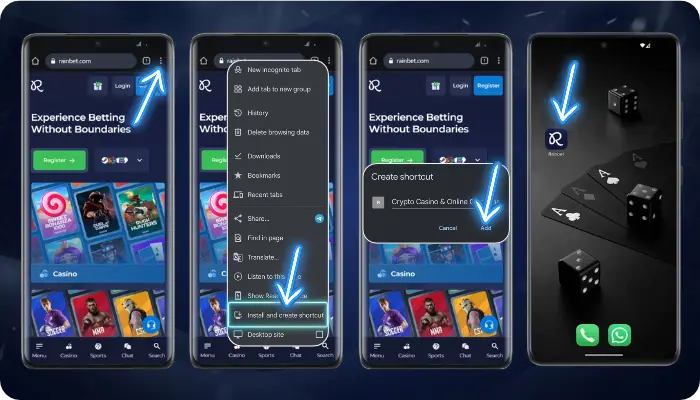
- Open our site in Chrome and sign in to your account before anything else. The shortcut shares Chrome’s login, so the icon will open straight into your account.
- Tap the three dots in the top right corner, next to the address bar. That opens the Chrome menu, where the option you need sits near the bottom of the list.
- Scroll down and choose Install and create shortcut. Older Chrome versions call it Add to Home screen, and both do the same job.
- Check the name in the Create shortcut window, then tap Add. Chrome fills in the page title by default, so rename it to Rainbet to spot the icon at a glance.
- Find the new icon on your home screen and tap it to land in the lobby. Hold and drag it next to your wallet or banking Apps, wherever your thumb goes first.
Nothing gets downloaded along the way, so Android never asks you to allow installs from unknown sources or grant the icon any extra permissions. Removing it is just as quick, as holding the icon and choosing Remove leaves your account and balance exactly as they were. That’s also the easiest check on any Rainbet mobile setup you come across, since a prompt to switch on unknown sources means the file isn’t ours.
How to Add Rainbet to Your iPhone
Safari comes built into every iPhone and handles the home screen step without any extra App, which makes it the natural choice for the Rainbet iOS setup. The newer Safari layout moved Share off the toolbar into a separate menu, so the steps below follow that design, with a screenshot for each tap. The whole thing takes under 30 seconds, a touch longer than on Android because of one hidden button.
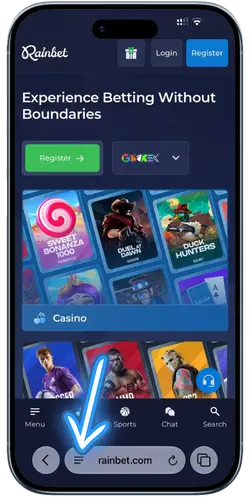
- Open the page menu
With our site loaded in Safari, tap the menu button to the left of the address bar at the bottom. Share now lives in this menu, which is why you won’t spot it on the toolbar.
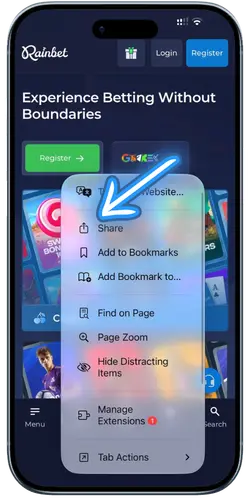
- Tap Share
Pick Share near the top of the menu. It opens the same sheet you’d use to send a link, and the home screen option sits inside it.
- Tap View More
Find View More at the end of the row of round buttons. Add to Home Screen is hidden from the first row, and this opens the full list of actions.
- Choose Add to Home Screen
Scroll down the list and tap it. This puts our site on your screen as an icon rather than a bookmark you’d have to dig out of Safari.
- Name it and tap Add
Swap the long page title for Rainbet so the icon is easy to spot, leave Open as Web App switched on and tap Add in the top corner. With the toggle on, the site launches as a Web App instead of a regular Safari tab.
- Open it from your home screen
Tap the new icon and sign in if it asks. If the lobby opens without the Safari address bar, the setup worked and the icon is ready to use.
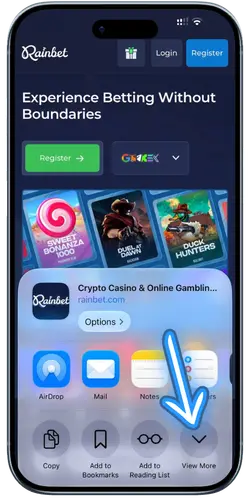
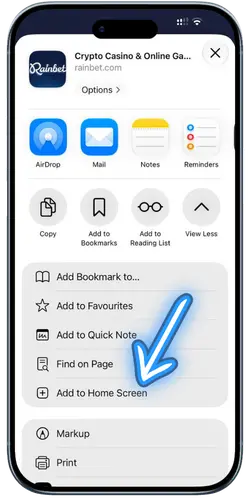
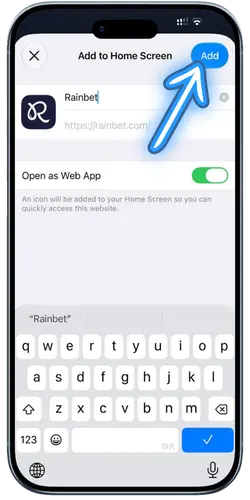
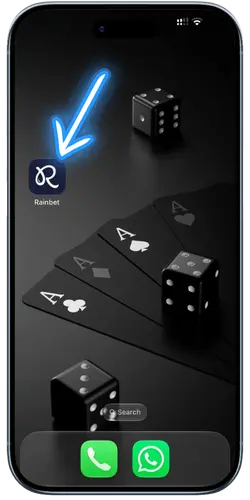
If Add to Home Screen still doesn’t show after View More, scroll to the bottom of the list and tap Edit Actions to pin it to your favourites for next time. Chrome on iPhone has the same option in its own share menu, so Safari isn’t the only route in. And if the icon ever opens in a normal Safari tab, remove it and add it again with Open as Web App switched on.
Fake Rainbet Apps and APK Files
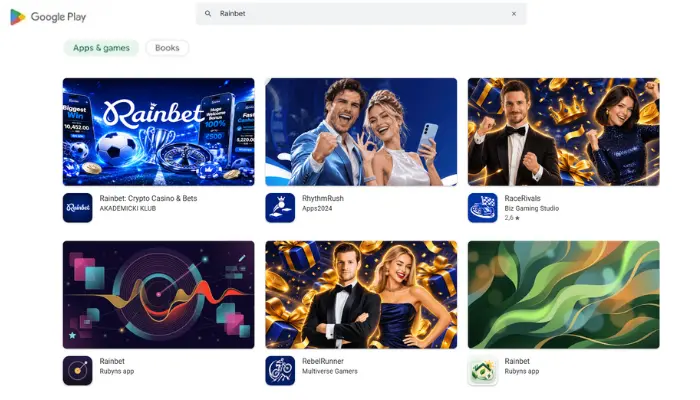
Type our name into Google Play and you’ll find a string of Apps called Rainbet, from quiz and arcade games to listings that copy our logo and banners, all published by developers with no link to us. They borrow the name to catch searches. Since we never publish a file, any Rainbet APK on a download site is unofficial by definition, and a fake APK can look polished enough to pass at first glance.
- Requests for SMS, contacts or accessibility access. Our Web App needs no phone permissions at all, so a prompt like this points to an App that wants more than it needs.
- A prompt for your crypto wallet’s seed phrase. Our cashier connects wallets through a QR code and never needs your recovery words.
- A Curaçao licence badge. Our gaming licence comes from Anjouan, and a different regulator on the page means a different operator.
- Payment options our cashier doesn’t list, such as MiFinity or Jeton. Money sent that way goes to the clone and never reaches a Rainbet balance.
- A message asking for your password or 2FA code. Our support team never asks for either, whether in live chat or through a DM on social media.
If anything on your phone already matches this list, uninstall it, change your password on our site in a browser and turn on 2FA. Then let our support team know through live chat, and use the table below to check how the real Rainbet App compares with a copy.
| Check | Official Web App | Fake App |
|---|---|---|
| Where it comes from | Our site, added from Chrome or Safari | A download link, a store listing or a message |
| What lands on your phone | A home screen icon | An .apk file or a separate game |
| Address you play on | rainbet.com | A lookalike domain or none shown at all |
| Your account | The same login and balance as on a laptop | A new sign-up, or your old details asked for again |
| Deposits | Credited to your Rainbet balance | Sent to whoever runs the copy |
Reporting a copy helps the next player steer clear of it. On Google Play, open the listing, tap the three dots and choose Flag as inappropriate, and report a lookalike website through Google’s Safe Browsing page so Chrome can warn others once it’s checked. If money has already gone to a fake, keep the transaction ID and screenshots and report it at your local Garda station, as payments made to a site that isn’t ours never reach us.
Playing Rainbet Originals on Your Phone
Each game opens in demo mode before you enter a stake, which is the easiest way to get a feel for the buttons with your thumb. Across the Rainbet Originals, those buttons sit in a single column under the game, so nothing needs zooming or turning the phone sideways. The info icon next to the game name shows the rules and bet limits, with rounds from €0.10.
| Game | Mobile controls | Session length |
|---|---|---|
 Dice | Drag the Roll Over slider, or type a target into Multiplier or Win Chance | One tap per roll, with Auto for a set run |
 Mines | Tap tiles on a grid of 25 to 64 squares, or hit Pick Random | One round lasts until you cash out or hit a mine |
 Plinko | Pick a risk level and slide the rows up to 16 | One drop per tap, or a run set on the Auto Bet slider |
 Limbo | Type a target multiplier or a win chance, and the other field adjusts | One tap, one instant result |
 Chicken Cross | Tap Cross for one lane, or tap tiles ahead to play several at once | Lane by lane until you tap Cash Out |
Tap the star under any game and it joins your Favourites, so the Rainbet mobile casino keeps your shortlist a tap away instead of a scroll through the lobby. The Fair Play button at the top of each game lets you check any round right in your phone’s browser, the same way it works on a laptop.
Slots and Live Casino on Mobile
Most slots in the Rainbet casino App fill an upright screen with the reels on top and the spin button under your thumb, and many have a free demo to try first. Live tables only run with a real stake, so it pays to know which ones are easiest to handle on a small screen before you sit down. These are the picks from each lobby section that suit a phone best.
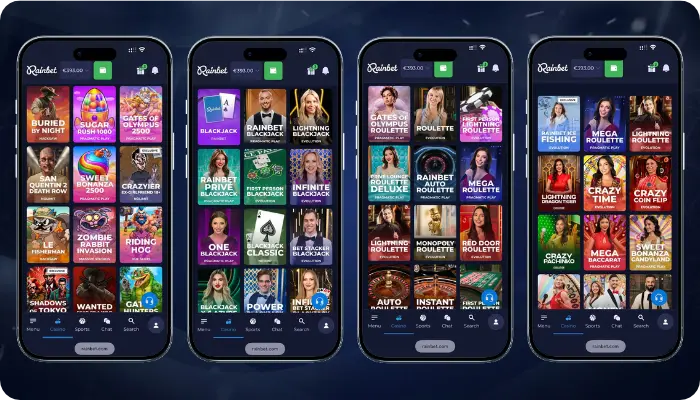
- Slots. Gates of Olympus 2500 switches to a portrait layout on a phone, so the full grid stays in view without turning the screen. Sugar Rush 1000 uses a square 7×7 grid that sits naturally on a tall display, and a couple of demo spins show how either one fits your phone.
- Blackjack. Rainbet Blackjack needs only a few buttons per hand, so Hit, Stand, Double and Split all sit within reach of one thumb. ONE Blackjack takes any number of players at once, which means you never wait for a free seat.
- Baccarat. Rainbet Baccarat and Mega Baccarat come down to three main bets, Player, Banker or Tie, so the betting area stays uncluttered even on a compact phone. It’s the easiest live table to learn if you’ve never sat at one.
- Roulette. Lightning Roulette and Rainbet Auto Roulette show a compact betting area when held upright, which works well for quick bets. Turning the phone opens the full table, handy when you want chips on single numbers.
- Game Shows. Rainbet Ice Fishing and Crazy Time put a big wheel on top with a handful of bet spots below, so they’re simple to follow one-handed. Ice Fishing runs only at Rainbet, while Crazy Time packs four bonus games into the wheel.
If a game opens sideways on its own, it was designed for a horizontal screen only, and turning the phone gives you the full layout instead of a squeezed one. Anything you opened lately waits in the Recently Played row, so getting back to a slot or a table takes one tap.
Betting on Sport From Your Phone
Whether it’s the Premier League on a Saturday, Ireland at the Aviva in the Six Nations or a CS2 map late in the evening, live betting from your phone follows the same five steps. Irish meetings show up on the racing tab on the days they run, Tramore included, with bets open right up to the off.
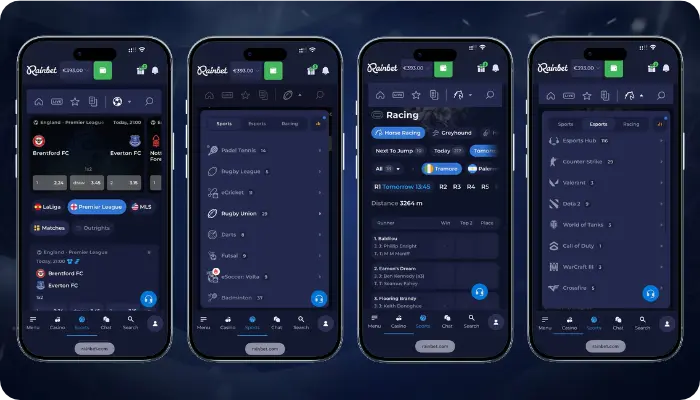
- Tap Sports in the bottom bar, then the LIVE icon at the top for matches in play. The sport menu beside it switches between the Sports, Esports and Racing tabs.
- Open the match you want to follow. The live score and match stats sit above the markets, handy when the game on the telly is a few seconds behind.
- Tap the odds you like to add them to the bet slip. On a race card the prices sit in Win, Top 2 and Place columns next to each runner.
- Open the bet slip, type your stake and check the potential return before you confirm. Both show in euro, so a fiver on the slip means exactly €5 from your balance.
- Follow the bet under My Bets. Where a Cash Out button appears, tapping it settles the bet early at the amount shown.
Live markets in the Rainbet casino App pause for a few seconds after a goal, a try or a red card, so an odds button or a Cash Out offer can vanish just as you reach for it. Wait for the market to reopen and check the new price before you decide, rather than tapping the first number that comes back.
Crypto Deposits and Withdrawals on Mobile
Paying in from a crypto wallet on your phone comes down to picking the coin, picking the network and sending. Copy the address with one tap, scan the QR code if the wallet sits on another device, or use Deposit from Wallet, which links 300+ wallets such as Coinbase, MetaMask and Binance so no address needs typing at all.
| Coin | Network | Min deposit | Typical speed |
|---|---|---|---|
 USDT | TRC-20 (TRON), BSC, SOL, POL | €4.55 | Usually under a minute |
| USDT | ERC-20 (Ethereum) | €4.55 | About 2 minutes |
 USDC | SOL, POL, BNB, Basechain, HyperEVM, ARB | €4.55 | Usually under a minute |
| USDC | ERC-20 (Ethereum) | €4.55 | About 2 minutes |
Before you send, check that the network in the Rainbet mobile casino cashier matches your wallet, as the red notice under the QR code names it. An Ethereum-style address looks the same on every network in the table apart from TRON and SOL, so the address alone won’t flag a mismatch. Withdrawals label the address field by network, and the fee shown is charged by the blockchain, not by us.
Claiming Rakeback and Joining Races on the Go
Most perks at Rainbet run on timers, with rakeback refilling fastest of all, so the phone in your pocket is the simplest way to keep up. The routine below takes under a minute and picks up whatever you earned on the laptop too, since everything sits on one account.
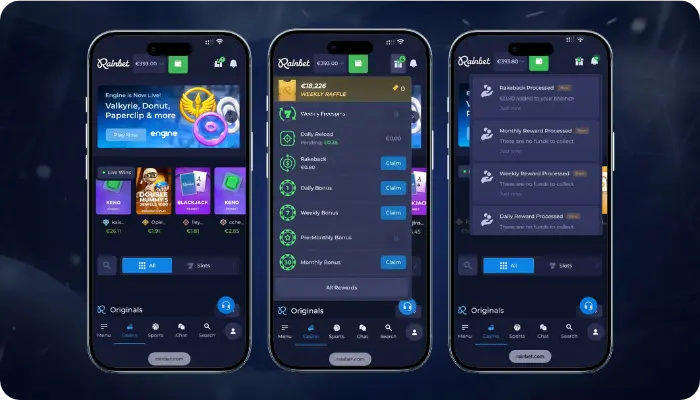
- Tap the gift icon in the top bar to open Rewards. The number on it shows how many claims are waiting, so you know at a glance whether it’s worth opening.
- Claim your rakeback first. It refills every 15 minutes from the bets you’ve placed, and the amount lands in your balance as soon as you tap.
- Take the Daily Reload when it appears. It comes round three times a day, eight hours apart, and expires 24 hours after it shows up.
- Tap Claim on any Daily, Weekly or Monthly Bonus that shows a blue button. Bonuses tied to a higher rank stay greyed out with a lock until you reach it, so you always know what’s still ahead.
- Check your place on the race leaderboard before you log off. The daily board closes at midnight UTC, which is midnight in Ireland in winter and 1am in summer.
None of these claims needs a bet, so a quick tap is enough to bank what’s already yours. Timed bonuses don’t wait, though, as an unclaimed one drops once the next one opens, which makes the Rainbet App IE icon on your home screen a handy two-second check during the day.
Web App vs Desktop
Opening the web app on your phone doesn’t trim the product, since it loads the very same site you use on a laptop. The differences come down to screen space and how you get in, which the table sets out row by row.
| Feature | Web App | Desktop |
|---|---|---|
| Installation | Added from Chrome or Safari in under a minute | None, just open the site in any browser |
| Storage | Only the icon, as games stream rather than download | Nothing beyond normal browser cache |
| Speed | Load times follow your mobile data or Wi-Fi | Usually quickest on home broadband |
| Notifications | Reward and bet alerts under the bell icon | The same alerts under the bell icon |
| Originals | Every game, with the controls stacked under the board | Every game, with more room for the board and recent results |
| Sportsbook | Live betting and Cash Out from the bottom bar | The same markets, with more of them visible at once |
| Cashier | Copy the address or connect a wallet App on the same phone | Scan the QR code with the wallet on your phone |
| Updates | Automatic, picked up the next time you open the icon | Automatic, picked up on the next page load |
In practice the Rainbet casino App suits short sessions, a rakeback claim on the bus or a live bet during the match, while the laptop wins for long evenings at the live tables. Since nothing is locked to either device, there’s no reason to pick just one.
Device Requirements
There’s no separate minimum on our side, since the web app runs inside a browser you already have. What counts is a browser that still gets updates, so the table lists the Android and iPhone versions current Chrome and Safari need, along with the connection you’ll want for each.
| Platform | Minimum OS | Recommended browser | Connection |
|---|---|---|---|
| Android | Android 10 or later for current Chrome | Chrome | 4G, 5G or Wi-Fi |
| iPhone | iOS 26 for the Open as Web App toggle, earlier versions still add the icon | Safari | 4G, 5G or Wi-Fi |
| iPad | iPadOS 26 for the same toggle, earlier versions still add the icon | Safari | Wi-Fi, or 4G and 5G on cellular models |
A phone stuck on Android 8 or 9 can still open the site on Chrome 138, but that version no longer gets security fixes, so a Rainbet Android shortcut is safer on a device that updates. On older iPhones the icon still opens without Safari’s bars, because our site is set up as a web app. Live tables are the part that needs the strongest signal, while slots, Originals and the cashier run comfortably on ordinary 4G.
Fixing Common Mobile Problems
When something stops working on your phone, the cause is usually the device or the connection rather than your account, so your balance stays put while you sort it out. On Rainbet mobile the five common problems below each come with the quickest fix first.
| Problem | Cause | Fix |
|---|---|---|
| Site won’t open | A security check that hasn’t finished, a weak connection or a country we don’t serve | Let the Cloudflare check clear, then refresh or switch between Wi-Fi and mobile data. A VPN won’t help and breaks our terms |
| Icon disappeared | A phone clean-up, a launcher reset or cleared browser data | Add it again from Chrome or Safari, as your account and balance aren’t touched |
| Live tables lag | A weak signal or a busy network | Lower the video quality in the table settings or move onto Wi-Fi |
| Deposit hasn’t arrived | Confirmations still running, the wrong network or a missing memo, the extra code some coins need | Check the status in your wallet’s history, then message live chat with the TXID |
| Logged out | Closing the browser ends the session, and clearing cookies does the same | Sign in the same way you signed up, as Google, Telegram and wallet accounts have no password |
The TXID, sometimes called the transaction hash, sits in the transaction details of your crypto wallet, and it’s the one detail support needs to trace a deposit. Copy it before you open live chat, along with the coin, the network and the amount, so the team can follow the transfer without any back and forth.
Staying Safe When Playing on Your Phone
Your phone often holds both your casino account and your crypto wallet, which makes a few minutes of setup worth it. These six habits cover the Rainbet App side and the wallet side, and none of them takes longer than a minute.
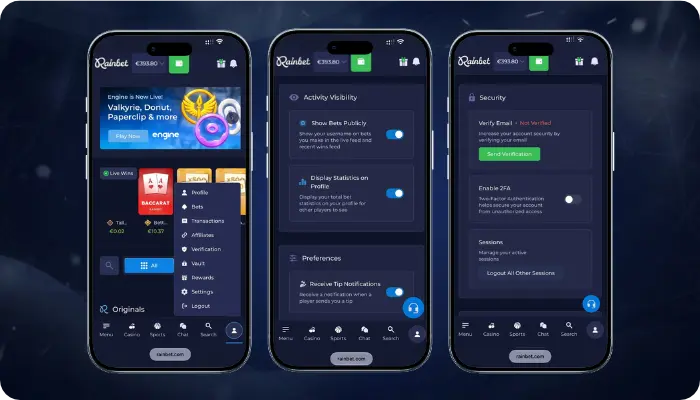
- Tap the profile icon at the bottom right, open Settings and switch on Enable 2FA under Security. From then on the code is needed to sign in, withdraw, tip or move funds out of the vault, so keep the setup key on paper as well.
- Verify your email with the Send Verification button in the same section. Removing 2FA only works by email from your registered address, so that inbox is your way back in if the phone goes missing.
- Turn off Show Bets Publicly under Activity Visibility. Your username then stays out of the live wins feed, which gives scammers one less reason to message you.
- Open Rainbet only from the icon you saved yourself. Links in texts, DMs or ads can lead to lookalike login pages built to catch your details.
- Keep your crypto wallet’s seed phrase off the phone. A screenshot can end up in cloud backups, while paper or a hardware wallet stays out of reach.
- Set a screen lock with a PIN, fingerprint or Face ID. If the phone is ever lost, Logout All Other Sessions in Security closes every other login from your laptop.
Our gaming licence comes from Anjouan, and we don’t hold a licence from the GRAI, Ireland’s gambling regulator. The main page sets out what that means in practice, while the habits above are what keeps your Rainbet App Ireland account safe day to day.
Responsible Gambling on Mobile
A mobile casino goes everywhere your phone does, which is why limits on the phone itself matter as much as the ones in your account. Each tool in the table takes a couple of minutes to set up, and the device ones work even on days you’d rather not open the site at all.
| Tool | Where to find it | What it does |
|---|---|---|
| Account limits | Responsible Gambling, at the foot of any page | Sets a loss limit, a cool-off or self-exclusion straight from your phone, with no laptop needed |
| Home screen icon | Hold the icon and choose Remove | Puts one more step between you and the lobby, which makes a break easier to keep |
| Screen Time on iPhone | Settings, Screen Time, Content & Privacy Restrictions | Blocks our site once it’s on the Never Allow list, and a passcode set by someone you trust keeps the block in place |
| Digital Wellbeing on Android | Settings, Digital Wellbeing | Runs a site timer that pauses our site in Chrome until midnight once the time is up |
| BetBlocker or Gamban | Free and paid Apps for Android and iPhone | Blocks gambling sites across every browser on the phone, the web app included |
If playing on the Rainbet App IE has stopped feeling like fun, free help in Ireland is a call or a click away. Gambling Care runs a 24/7 helpline, Extern Problem Gambling offers free counselling and its own Stop Gambling App, and Gamblers Anonymous Ireland lists meetings in person and online.
Rainbet App FAQ
There’s no Play Store listing, so the closest thing to a Rainbet App download on Android is a Chrome shortcut that opens our full site from your home screen. You can add it on as many phones and tablets as you like, and every one of them leads to the same account.
No, and any App Store listing using our name isn’t ours. The Rainbet iOS version comes from Safari’s Add to Home Screen, and the same steps work on an iPad.
No official Rainbet APK exists, so any file with that name is a fake APK made by someone else. Android’s Play Protect may flag it, but deleting the file is safer than waiting for a warning.
Yes, every Originals game plays on a phone with the same limits and payouts as on desktop. Bets from both devices show up under Bets in your profile menu, so you can check a laptop round from your phone.
No, the home screen shortcut loads the current version of our site every time you tap it, so there’s nothing to install. If a page ever looks out of date, close it and tap the icon again to bring up the latest one.